DNSC 6290: LLMs: Concepts and Applications

George Washington University | Department of Decision Sciences
Lecture 6: Tool use and agentic workflows
The GW Beamer deck covers tools, fixed workflows, agents, function contracts, Text2SQL as an example tool, external connectivity and MCP, bounded loops, orchestration, permissions, agent identity, oversight, and evaluation. It contains 18 content slides, a title, and two reference slides. Bounded loops open the Orchestration and oversight section, before orchestration patterns and permission controls. The Text2SQL notebook applies the same loop controls to SQL error repair.
Setup and run
From the repository root:
uv sync --locked
uv run jupyter lab lecture/lec_6/
Add OPENAI_API_KEY to the ignored repository-root .env file. Both notebooks
load that file and use a secure getpass fallback. They call the direct OpenAI
API, with gpt-5-mini as the teaching default; OPENAI_TEXT_MODEL can override
it with a model supporting Responses function calling and structured outputs.
The examples use low reasoning effort, bounded output tokens, a 45-second HTTP
timeout, and at most one SDK retry. Running them incurs API usage.
VS Code
JupyterLab is optional. After uv sync --locked, open the repository root in
VS Code with Microsoft’s Python and Jupyter extensions installed. Open either
Lecture 6 notebook; in Select Kernel, choose Select Another Kernel… →
Python Environments → .venv/bin/python (macOS/Linux) or
.venv\Scripts\python.exe (Windows), then run the cells in order. See the
root VS Code setup for details.
VS Code supports the top-level await used by mcp_calculator.ipynb. The
notebook still starts and stops its local MCP server automatically; do not run
calculator_server.py separately for this workflow.
- Text2SQL compares a fixed pipeline and one bounded agent on a deterministic, synthetic SQLite sales database. It shows validated tool contracts, a shared read-only executor, blocked operations, row truncation, query interruption, a deliberately seeded column-error repair, explicit stop states, traces, and five reference/behavior cases for each approach.
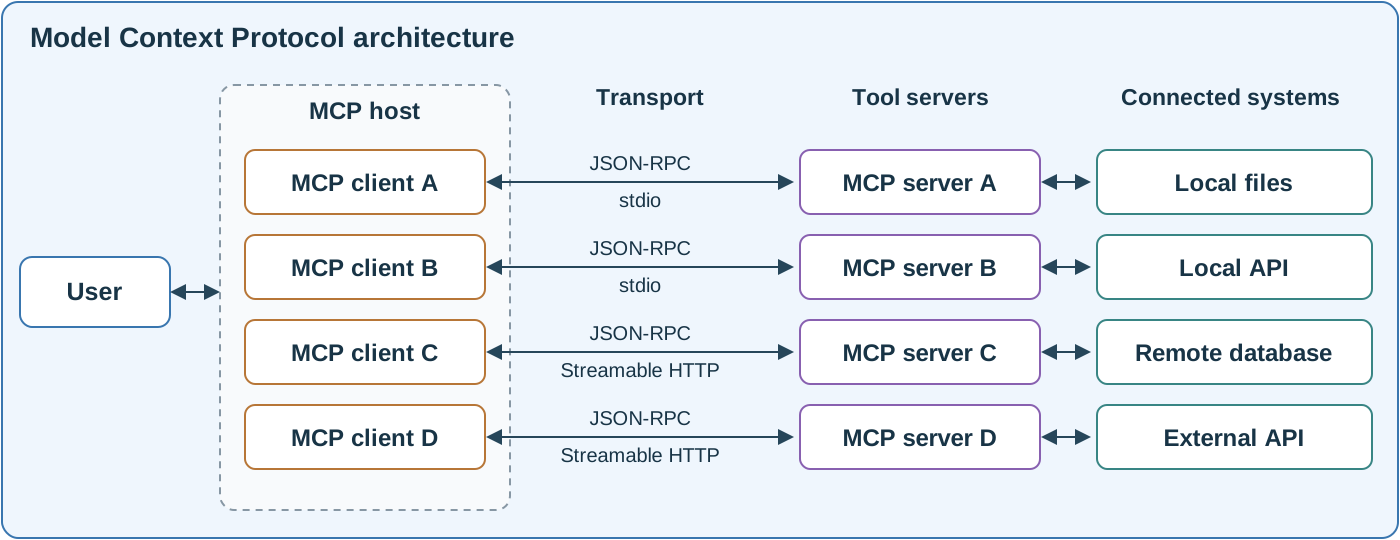
- MCP calculator discovers two safe tools on
calculator_server.py, a separate local subprocess.
The model selects
revenue_growthinstead of the irrelevantsort_numbers; the host validates and invokes that choice. The notebook prints discovery, the live request, the protocol result, and the final explanation of 25% revenue growth. It also checks rejection of a zero denominator and starts and cleans up the server automatically.
Run each notebook from the first cell to the last. The MCP notebook uses
Jupyter’s top-level await; it does not require a second terminal or a port.
For another stdio-capable host, the standalone server command is:
uv run python lecture/lec_6/calculator_server.py
That command waits for MCP protocol input. It is not an interactive calculator prompt. Do not start it separately for the notebook. The MCP dependency is constrained to the v1 SDK API and resolved in the project lockfile; v2 examples in newer SDK documentation may use different imports or lifecycle methods.
Data and controls
The temporary database is recreated on each run and removed at the end. The reference date is 2026-10-15; the previous calendar quarter is July–September
- Net sales subtract total line discounts from completed-order item amounts, treating missing discounts as zero and missing regions as Unknown. Money is stored in cents and displayed in USD.
utils.py contains the fixture, approved schema and definitions, and SQLite authorization/execution controls. Model prompts, schemas, dispatch, traces, workflows, loops, and evaluation remain in the notebook. The executor uses a read-only connection, a default-deny authorizer, a function/table allowlist, a 50-row output cap, and a cooperative 0.2-second progress deadline. A truncated result is not accepted as complete. These are teaching controls, not a production sandbox or a hard real-time guarantee.
The ordinary comparison has no injected fault. The repair demonstration seeds
a known invalid query and labels it instructor-seeded in its trace. Evaluation
prints failures and their traces instead of requiring perfect model accuracy.
The fixture is too small to support a general reliability claim; inspect SQL
semantics and explanations, then test held-out questions and database variants.
Verification and slide build
Execute both notebooks with live API access:
uv run jupyter nbconvert --to notebook --execute --inplace \
  --ExecutePreprocessor.timeout=240 \
  lecture/lec_6/text_to_sql.ipynb lecture/lec_6/mcp_calculator.ipynb
Build the deck with TeX Live, latexmk, and biber:
cd lecture/lec_6
latexmk -pdf -interaction=nonstopmode -halt-on-error lecture_6.tex
The selected, source-checked bibliography is in references.bib. Slide 9’s MCP diagram has an editable SVG source and a committed vector PDF used by pdfLaTeX. See asset notes for provenance and how to regenerate the PDF after editing the SVG. instructor_notes.md explains design decisions, evaluation limits, source provenance, and facilitation points. The original Text2SQL teaching example provides the fixed-pipeline starting point; the new database, controls, direct API integration, agent loop, and MCP example are lecture-specific.